Accueil
» Wiki
»
2 Ways to Fix Network Congestion That Slows Down Wi-Fi
2 Ways to Fix Network Congestion That Slows Down Wi-Fi
Have you ever wondered why your Wi-Fi isn't giving you the speeds you expect? Or why it keeps disconnecting as you move around your home? Wi-Fi networks are affected by many factors beyond routers, bandwidth, and interference, but there are some smart ways to boost your network.
What is network congestion?
Network congestion occurs when your network cannot send all the data packets back and forth between your router and connected devices. The result is a delayed Internet connection and high levels of noise, packet loss, and latency.
Think of your network as a pipe, and packets of data flowing through it. If the pipe isn’t wide enough for all the packets that want to pass through, some packets will have to wait while others will go through just fine. You can set up QoS on your router to prioritize traffic and mitigate the problem to some extent, but if you don’t have it set up (or don’t have it enabled), everyone will have a bad internet experience.
Remember, this has nothing to do with your internet speed. So you can have the fastest internet package your ISP offers, but if your router, and specifically your network bandwidth, isn’t up to the task, a lot of that bandwidth is going to be wasted. There’s a difference between the bandwidth your ISP gives you and what your router can use. This is one reason why you should switch ISP-provided routers as soon as possible.
The delay in packets reaching the router and then being routed to a device isn't always obvious. If you're gaming, you'll definitely experience high ping or packet loss, but if you're streaming a movie, there's generally enough cache to get packets to your device in a timely manner.
Occasionally, you should analyze your Wi-Fi network to see if you’re connected to a congested Wi-Fi channel. Your router will automatically try to connect you to the best channel possible, but it doesn’t always get it right. Luckily, this problem is fairly easy to fix.
Fix Wi-Fi channel
The first step to avoiding network congestion is to switch to a better channel. If you’re still using a 2.4 GHz router, the number of available channels is quite low, and most, if not all, of these channels will be subject to interference from other devices within range of the router, including other routers and even household appliances.
Generally speaking, channels 1, 6, and 11 are best if you’re using a 2.4 GHz network. However, this will vary depending on your location and how much interference your router is dealing with. 5 or 6 GHz routers have access to significantly more channels, so connecting to these Wi-Fi bands will give you better speeds and stability.
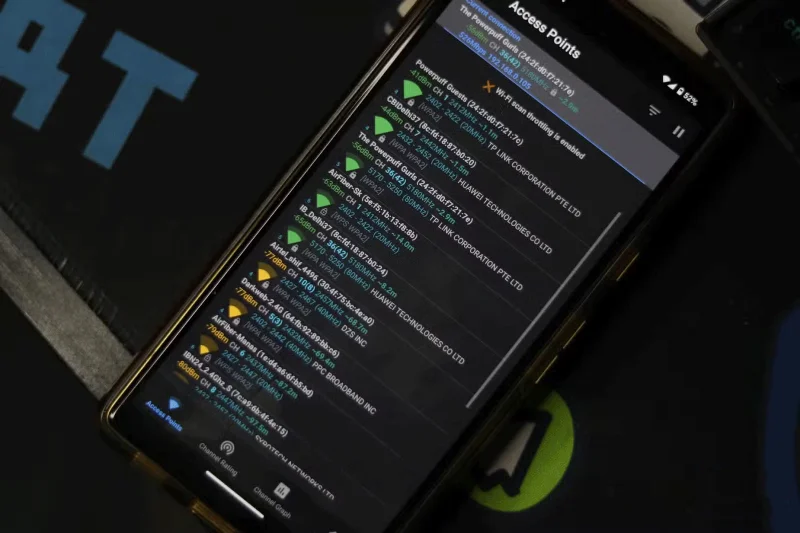
The best way is to use a Wi-Fi analyzer app and find out the best channels on each available Wi-Fi band. You can then configure your router to connect devices to these channels and thus avoid the problems that a congested network can cause.
Use less congested Wi-Fi bands
First, if your router doesn't support the 5 or 6 GHz Wi-Fi band, you should consider purchasing a new router that has these essential features.
These bands use channels that are less prone to interference from other devices, have more channels, and offer more bandwidth than 2.4 GHz channels (at the expense of range). As mentioned earlier, these bands also have significantly more channels, meaning they can withstand more interference before Wi-Fi starts to degrade.
Multiple access points listed on WiFi analyzer app
Switching to the 5 GHz or 6 GHz band will significantly increase the WiFi speeds and stability you get from your connection. These higher frequency, less congested bands give you better speeds, more bandwidth, and more stability so you can finally make reasonable use of the bandwidth your ISP provides. They’re not as good as a regular Ethernet connection, but they’re far superior to the standard 2.4 GHz band you might be using.
Network congestion is a cause of slow Wi-Fi without you even realizing it. As more and more wireless devices start operating in close proximity, the problem gets worse. Luckily, the fix is simple and doesn't require a complete overhaul. A better Wi -Fi router and some smart configuration will help you get the most out of your Internet connection.